
Creators rebuild positions
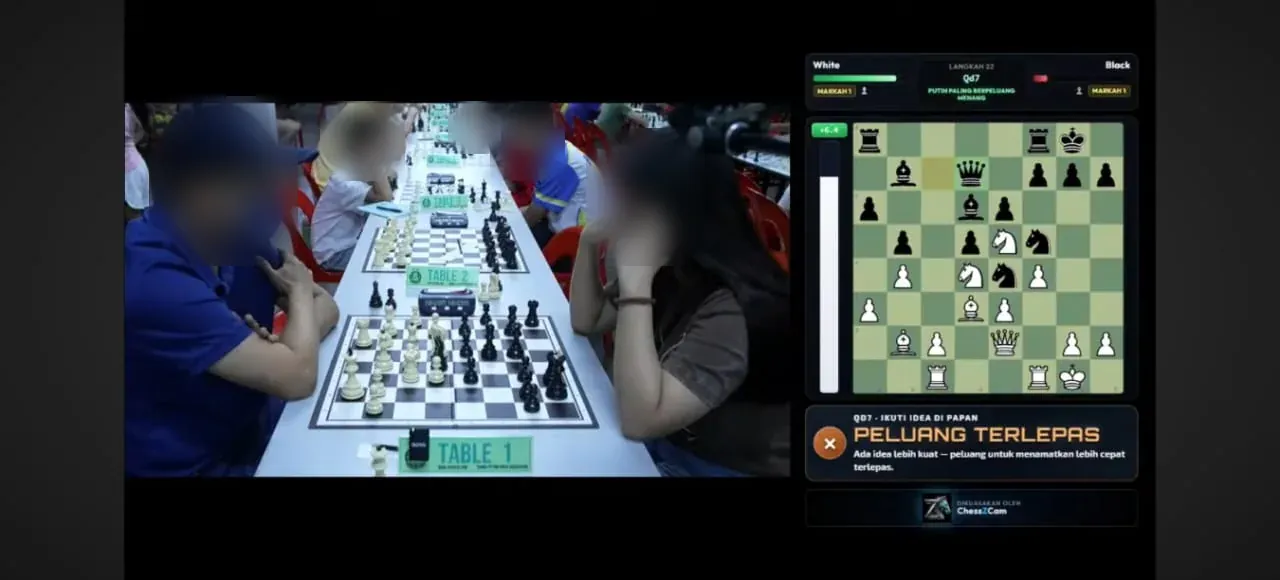
They rewind footage, identify each move, recreate the digital board and then line up graphics with the video.
Solutions & guides · one app, several real jobs
ChessZCam is built for people who record, explain, review or broadcast physical chess. Choose the job you actually need to finish, then open the guide written for it — without reading every technical detail first.
Choose by outcome
Each guide stays focused on one audience and one practical result. The full product page is there when you need the technical detail.
Cut the pause, rewind, move-entry and timeline-matching routine. Analyze Video reads each move with its timestamp; Sync PGN to Video (Android app; not in the first Studio release) lines up a PGN you already have.
Explore the core workflow → CREATORS · VIDEO & STREAMINGKeep your time for explanation and storytelling, not rebuilding positions. Export a PGN, an MP4 with the overlay up to 4K, or a transparent WebM or PNG sequence for your editor.
For content creators → NEW · OTB CREATORSThe whole creator workflow in motion, with real screens and October 2026 tournament photos — and where ChessZCam can complement tools such as idChess and DGT boards.
Watch the workflow → NEW · RECORDING GUIDENine illustrated rules and a printable checklist: camera angle, framing, light, a steady stand and settings for the best detection.
Open the recording guide → LIVE · ONE FEATURED BOARDA normal board, a phone running Broadcast Live and a Windows PC with ChessZCam Live, sending the position into your vMix or OBS production.
For organisers and streamers → COACHES · ACADEMIES · CLUBSTurn students' physical games into PGN with less repetitive setup, then use Stockfish grades and plain-language commentary to start the lesson where the decisions were made.
For coaches and clubs → FAMILIES · JUNIOR CHESSFor families who already record OTB games — where the organiser allows it — and want a PGN or a replay, not just a video. New: Viewer Mode for following the live board from outside the hall. A normal recording is often enough; this guide helps you decide.
See whether it fits your family → ALL AUDIENCESCreators, tournament organisers, coaches, clubs and families side by side — which operation fits each day, and what it produces.
See all use cases →The shared problem
Different people feel the same friction in different ways.
They rewind footage, identify each move, recreate the digital board and then line up graphics with the video.
A volunteer may have to follow the board by hand while also handling cameras, names, scores and the stream.
Before discussing decisions, they first need a usable move record from the physical game.
One app · six operations
| Your job | ChessZCam operation | Guide |
|---|---|---|
| Turn a recorded game into a PGN | Record Game Video, then Analyze Video | OTB video to PGN |
| You already have the moves (a scoresheet or PGN) | Sync PGN to Video | OTB video to PGN |
| Publish a video with a digital board | Analyze Video, then overlay video export | Content creators · OTB creators |
| Film a game so it can be read well | Record Game Video with the setup check — or any phone or camera on a stand | Recording guide |
| Show one board live on a stream | Broadcast Live + ChessZCam Live (for vMix & OBS) | Featured-board broadcast |
| Follow a live board from outside the hall | Viewer Mode — Android app, same Wi-Fi or hotspot; used at two tournaments in October 2026 | Viewer Mode |
| Prepare a lesson from a student's game | Analyze Video with Stockfish grades — and Open Project to continue a saved review | Coaches & clubs |
| Keep a junior game for calm review later | Record Game Video to keep the footage — or Detect Live Game for a PGN with no video saved | Chess families |
A PC adds resources, not concepts: a phone alone can record, detect, review and export; ChessZCam Studio on Windows adds a big screen and speed, and ChessZCam Live adds the broadcast console. Why it is built that way →
Guides & reference
Setup conditions, devices and known limits matter more than any feature list. Open these once you know your workflow.
Phone, board, Windows PC and the vMix or OBS overlay — how the pieces connect.
Read the overview → SETUPCamera position, a steady stand, light and the network: a calmer path from board to broadcast.
Open the setup guide → RECORDINGNine rules in pictures and a checklist for the best detection.
Open the guide → DEVICESAndroid phones, Windows PCs, boards, lighting and broadcast software to check first.
Check compatibility → HONEST LIMITSFraming, stand movement, contrast, lighting, device and Wi-Fi conditions, stated plainly.
See the limits → FEATURESThe six operations, review and repair, Stockfish analysis and overlay export in one place.
See the features → PRODUCT PAGEWhat's new, the overlay, live broadcast, field tests and the FAQ for the current builds.
Open ChessZCam → FIELD NOTEHow the correction tools keep the operator in control of the board.
Read the article → FOR ORGANISERSRegistrations, pairing posters, LAN results, winners and certificates around the event — Swiss-Manager and the arbiter keep authority.
See SwissMax →Current pre-release
Reduce repetitive move reconstruction by connecting a normal chessboard, a phone camera and a digital PGN or overlay workflow.
Results vary between venues. Moves and their timing still need review, and electronic boards remain the stronger choice for official, multi-board coverage.
Camera stability, lighting, board and piece contrast, blocked squares, device performance and operator setup.
Review the flagged moves, correct the board where needed and check the PGN against the video or the scoresheet.
The arbiter decides. ChessZCam is for recording, review and broadcast — never for settling a dispute at the board. It is built by one independent developer and chess parent, tested at real tournaments and still being finished, so constructive feedback is welcome. See the launch status or who builds this.
Real tournament footage
Both videos were made with ChessZCam Studio from real games. Human intervention was kept to a minimum, so they show today's abilities and limits honestly.
See the field-test photos → · Read what failed and what changed →
If you spot a wrong move in these videos, please tell us — the digital board can also move slightly out of step with the video, timing we are still refining. An earlier live beta-testing sample is still on YouTube: watch the earlier sample.
Questions before trying it
Not yet. ChessZCam is in active pre-release development: Studio 1.1.4 is the trial candidate, with Phone app 1.22 and Live 1.12 behind it, and builds have been tested at six real tournaments. Studio comes first, with a free 14-day trial on one PC that starts only when you agree to the terms and start it in Studio (no code needed). Package prices are on the ChessZCam page; waitlist members get 50% off their first ChessZCam package when sales open. Joining the waitlist is free and is not an order.
No. A normal camera recording can be enough for many families. ChessZCam is meant for people who need a digital position, a PGN, an overlay or a live broadcast alongside the physical game.
No. Electronic boards remain an excellent fit for official and multi-board coverage. ChessZCam offers a lighter phone-camera workflow for one selected board and smaller production teams.
No. Results depend on camera stability, lighting, board visibility, device performance and operator review. Uncertain moves are flagged for review instead of guessed, and the review and repair tools exist because real venues are imperfect.
For the first release, yes: ChessZCam Studio for Windows comes first and reads recordings from any phone or camera. When the Android app follows, a phone alone can record, detect, review and export; ChessZCam Live then connects the board to vMix or OBS.
No. ChessZCam is for recording, review and broadcast. Decisions at the board belong to the arbiter.
For a featured-board broadcast, ChessZCam. For registrations, pairing posters, LAN result entry, winner graphics and certificates, SwissMax — an independent companion beside Swiss-Manager, where Swiss-Manager and the arbiter keep authority.
Choose your workflow
Then check setup, compatibility and known limitations. Join the waitlist now: trial invitations go to the waitlist first, and members get 50% off their first ChessZCam package when sales open (packages). Joining is free and is not an order.