Oct 2026 ChessZCam: Studio first, Android next, Live last. Free 14-day Studio trial · 50% waitlist discount when sales open. Join the waitlist →

ChessZCam · Compatibility · October 2026

Check the practical stack before you test.

The first release is ChessZCam Studio for Windows 10/11, with a free 14-day trial: it analyses video from any phone or camera, or from a webcam or capture card. The Android app follows, and ChessZCam Live for broadcasting into vMix or OBS comes third. Hardware is only half of it: light, framing, a steady stand and the network matter just as much.

Windows 10/11 · Studio first Android · next vMix · OBS · Browser Source Offline after activation
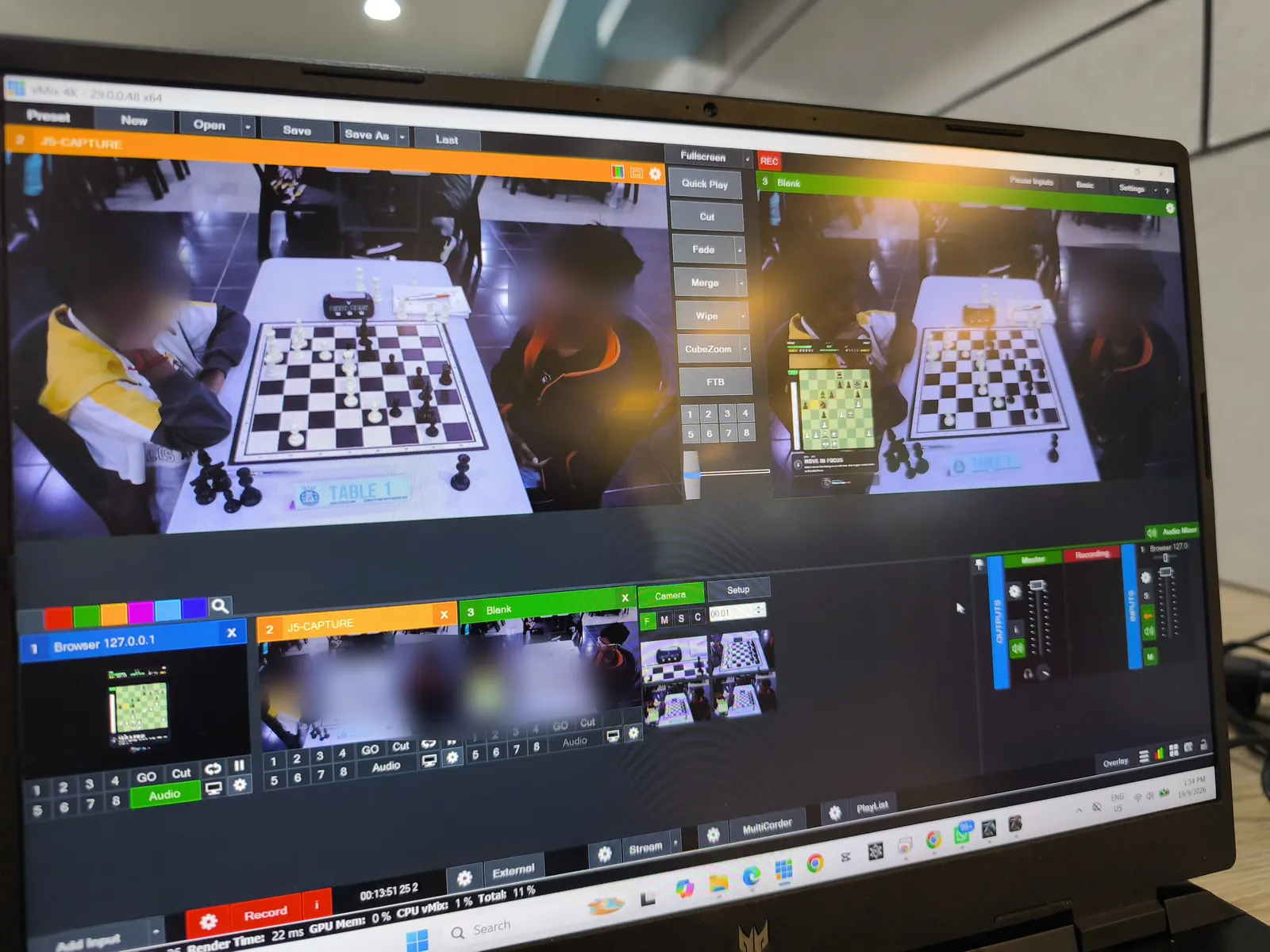
vMix on a Windows laptop at Lotus's Kulim, with the Table 1 camera and the ChessZCam overlay loaded as a browser input from 127.0.0.1

The intended stack · pre-release builds

One phone is enough. A PC adds resources.

Here is what each part of the setup does, and what it needs.

PHONE · REQUIRED

Android phone

An Android phone whose rear camera can frame the whole board. It runs all six operations: Record Game Video, Analyze Video, Detect Live Game, Broadcast Live, Sync PGN to Video and Open Project. The app is used in landscape; portrait (1080×1920) is one of the video export formats.

WINDOWS PC · OPTIONAL

ChessZCam Studio for Windows

The same app on a big screen, with the extra speed of a PC — its first trial release leaves out Record Game Video and Sync PGN to Video for now. It adds webcam, capture-card and OBS Virtual Camera input, render presets, and one-click pairing with the Live console on the same PC.

WINDOWS PC · FOR BROADCAST

ChessZCam Live (for vMix & OBS)

The operator console on the broadcast PC: a Tally-style status strip, a correction screen that blocks illegal positions, and the Overlay Designer.

BROADCAST SOFTWARE

vMix or OBS Studio

Add the overlay as a browser input in vMix or a Browser Source in OBS, on the same PC as ChessZCam Live. Other tools that accept a browser URL can use it the same way.

BOARD

An ordinary tournament set

A standard wooden or plastic set with clear contrast between squares and pieces, and pieces that stand firmly. You do not need an electronic board.

NETWORK · LIVE & VIEWER MODE

A local network you control

The phone and PC, and any viewer phones, need the same LAN: a reliable Wi-Fi router or a phone hotspot. Small game data travels over it, never video.

Studio 1.1.2 · trial candidate Phone app 1.22 Live 1.12

All pre-release (16 October 2026); Studio is first in line for the trial. Install the current phone and PC builds together, so both use the same pairing. That is the one thing worth checking before an event.

Tested in October 2026

The devices from the two October tournaments.

Used at Santai Catur SPS 2026 (3 Oct) and Tournament Cikgu Chess X Aeon Mall Taiping (10 Oct). Other devices may work as well; these are the ones we have seen working in a hall.

PHONES · ANDROID 16

Samsung Galaxy S25 Ultra · vivo V70

Live detection, Broadcast Live and Viewer Mode, phone to phone and with a PC. The app pins its own text size, so the screens look the same on both phones.

CAPTURE CARD · STUDIO

AVerMedia BU110 (UVC)

ChessZCam Studio on a Windows laptop with a camera through a USB capture card. Studio keeps the source's own aspect ratio instead of forcing 16:9.

WINDOWS · LIVE

ChessZCam Live + vMix

The Live console on the production PC, with a Scan QR & connect pairing on the phone since the October builds.

What you need for each job

Start with a phone. Add a PC when the job needs one.

You want to…You needWhat you get
Record and review a gameOne Android phoneRecord, detect, review and repair, Stockfish on the device, PGN and overlay-video export. It is a complete product on its own.
Broadcast a board live+ a Windows PC running ChessZCam Live and vMix or OBSA live overlay with operator correction. The phone sends the moves; your broadcast camera provides the picture.
Review and render on a big screen+ a Windows PC running ChessZCam StudioThe same app with more speed and screen space, webcam, capture-card or OBS Virtual Camera input, and render presets for overlay video.
Let parents and coaches follow the board+ the ChessZCam Android app on each viewer's phone, on the same Wi-Fi or hotspotViewer Mode, in trial builds: a read-only live digital board for spectators outside the playing hall. Two phones are enough; a PC is optional. Not on iPhone, not in a web browser.

Each step keeps everything the one before it could do. Anything you can do with a phone alone stays possible with a phone alone; the PC adds a bigger screen, more speed and the link into your broadcast software, never a capability the phone-only user loses. The thinking behind this is in A PC adds resources, not concepts.

vMix & OBS

How the live overlay connects.

  • The overlay is a browser URL, not a video feed. Put it above your camera as a browser input in vMix or a Browser Source in OBS.
  • Run vMix or OBS on the same Windows PC as ChessZCam Live. The console and overlay can only be reached from the machine running them; spectators now have a separate read-only Viewer link on the same network.
  • The phone and the PC pair with a code, so your detector belongs to your phone alone, even on a shared hall network.
  • The detector can be the phone, or ChessZCam Studio on the same PC with a webcam or capture card. Studio pairs in one click, with no IP address to type.
  • Many halls isolate guest devices on their Wi-Fi. A dedicated router or a phone hotspot is the reliable choice.

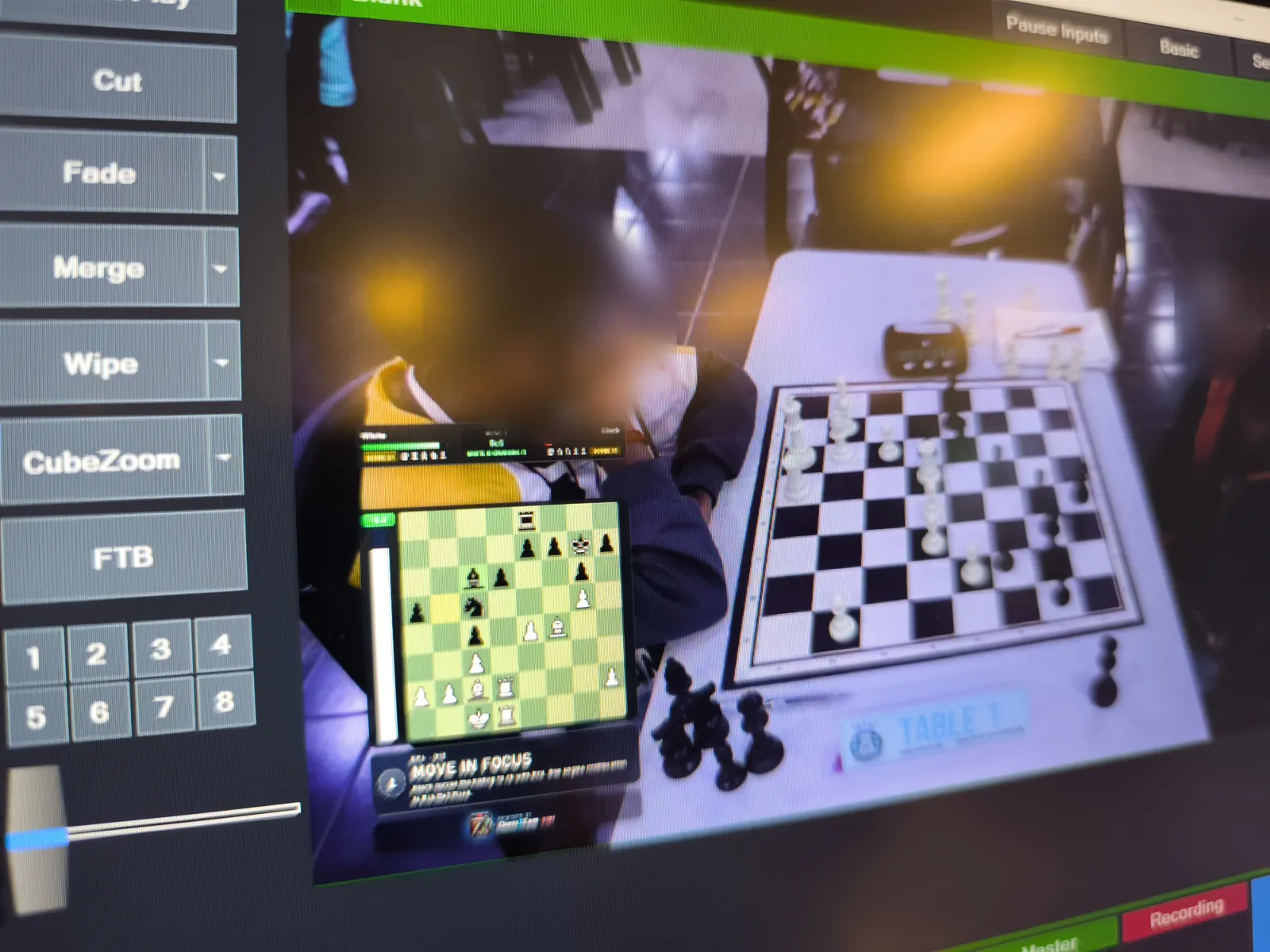
Field-tested · 19 Sep 2026 · Lotus's Kulim

A phone on a boom arm watched Table 1, and the position went live into vMix over the venue's own network (Phone app 1.14 · Studio 0.18 · Live 1.5). The first live YouTube production was on 18 July 2026 at the Saiful Arena Chess Tournament @ Taiping Mall. All field tests →

vMix output with the ChessZCam digital board over the live Table 1 picture at Lotus's Kulim
On air at Lotus's Kulim: the ChessZCam board over the Table 1 camera in vMix.

Not supported yet

What ChessZCam does not cover today.

We would rather tell you now than have you find out at the venue.

iPhone

The phone app is Android only. There is no iPhone version.

macOS as the PC

ChessZCam Studio and ChessZCam Live are Windows 10/11 apps.

A whole hall of boards

A broadcast follows one active source at a time, so one board per phone and console. ChessZCam is for featured boards. It does not replace a fleet of electronic boards.

Watching from home

Viewer Mode is now in trial builds, but only on the same Wi-Fi or hotspot and only in the ChessZCam Android app. It does not work over the internet or mobile data, on an iPhone or in a web browser.

We are keeping to Android and Windows first, and will look at other platforms only when demand and capacity are clear. If you need something that is not listed, tell us. Your requests shape the roadmap.

Environment checklist

The venue matters as much as the device.

Our field tests keep showing the same thing: camera position, a steady stand, good light and focus have the biggest effect on capture quality.

☀

Even lighting

Soft, even light across the board. Avoid harsh shadows, and glare on glossy boards.

⌖

All 64 squares in view

Put the stand at the side of the board with all four corners in frame. Use 0.5× wide zoom if your phone has it, and check that the tallest piece on the far square is still in shot. Players' hands should not cover the view for long. Each rule in a picture: the recording guide.

▲

A stand that will not be nudged

Lock the board, then keep the board and phone still. A bump means correction work for the operator. The recovery tools were built after a player touched the tripod mid-game in July.

↻

Rehearse the stream

Test the whole chain before a public event, ideally the night before. For long rounds, keep the phone charged and out of direct heat.

An honest word on accuracy. How accurately ChessZCam reads the game depends on the setup and the quality of the video, and uncertain moves are flagged for review rather than guessed. ChessZCam is for recording, review and broadcast. It must never be used to settle a dispute at the board; that is the arbiter's job. Read the known limitations and the setup guide before your first event.

Frequently asked

Compatibility questions, answered.

Does ChessZCam work on an iPhone?

Not at present. The ChessZCam phone app is for Android, and the PC apps are for Windows. That includes Viewer Mode: the viewer's phone needs the ChessZCam Android app. We are keeping to Android and Windows first and will look at other platforms only when demand and capacity are clear.

Do I need a PC?

For the first release, yes: ChessZCam Studio for Windows comes first, and it reads recordings from any phone or camera. When the Android app follows, a phone alone can record, detect, review and export; the PC then adds a bigger screen and speed (Studio) or broadcasting into vMix or OBS (ChessZCam Live).

Does it work with OBS as well as vMix?

Yes. ChessZCam Live serves the overlay as a browser URL, so it goes in as a browser input in vMix or a Browser Source in OBS Studio, on the same PC as ChessZCam Live. Other broadcast tools that accept a browser URL can use it the same way.

Can I use a Mac as the broadcast PC?

Not today. ChessZCam Studio and ChessZCam Live are Windows 10/11 apps, and vMix or OBS needs to run on the same PC as ChessZCam Live, because the console and overlay can only be reached from the machine running them.

Does ChessZCam need the internet?

Only once, to activate the Studio trial or licence. Detection runs on your device and your videos and games are never uploaded, so after activation recording, detection and export work offline. Live broadcast and Viewer Mode only need the local network between the devices; neither works over the internet.

How powerful does my phone need to be?

ChessZCam works best at 4 FPS or higher, which most modern phones manage comfortably. ChessZCam Studio on a PC is faster still: at Lotus's Kulim on 19 September 2026 it ran live detection at about 29 FPS on a laptop. In October 2026 a Samsung Galaxy S25 Ultra and a vivo V70 were used at two tournaments.

Can one PC follow every board in the hall?

No. A broadcast follows one active source at a time, so one board per phone and console. ChessZCam is built for featured boards and recorded games. It does not replace a hall full of electronic boards.

Early trial

Got the kit? Be first to try it on your board.

Join the waitlist now: trial invitations go to the waitlist first, starting with ChessZCam Studio and its free 14-day trial, and members get 50% off their first ChessZCam package when sales open (packages). Joining is free and is not an order.