
What's new in SwissMax 1.0
Four significant additions have landed in SwissMax since the last write-up: a certificate studio, a reusable club roster, a proper winner podium, and licensing built around a tournament hall rather than an office. Here is what each one changes about your day.
1. Certificates from the data you already trust
Certificates used to be the last task of tournament day, done by the most tired person present, usually from a copy of the results that had already drifted away from the official ranking. The E-Certificate Studio moves that work inside SwissMax, where the verified data already lives. Recipient names, categories and placings come straight from the tournament you loaded — nothing is retyped.
It is a layered designer: background, text, data fields, logos and signatures, each independently positioned, sized, rotated, aligned and undoable. Every value can be typed directly rather than only dragged, so if you need the title at exactly 48pt you say so. Text background colour, transparency, opacity, shadow, glow and outline all look identical in the preview and in the exported PNG.
Signatures come from the device everyone already has. Open the capture hub, scan the QR code with a phone, sign on the phone screen, and the signature arrives as a transparent PNG — no background to remove, because there never was one. Export one certificate, a batch ZIP, or send them straight to the printer at a true 300 DPI.
The longer story behind this module is here.
2. A club roster you build once
School and club organizers run the same faces every month. The Regular Players library stores them once and reuses them across every event — and, importantly, across every organizer profile. A profile is a tag and a filter, not a separate container, so switching profile never puts your roster out of reach.
When the same player turns up twice, records are merged carefully on strong identifiers. Anything genuinely ambiguous is left for a human to decide rather than resolved by a guess.
Alongside it, SwissMax now starts from nothing at all. New Tournament creates a working local workspace straight after installation, and Add player manually takes every text, date, number and gender field on its own — no spreadsheet, no Chess-Results link. Useful for the small club event where the roster lives in someone's head.
3. A podium that reads correctly
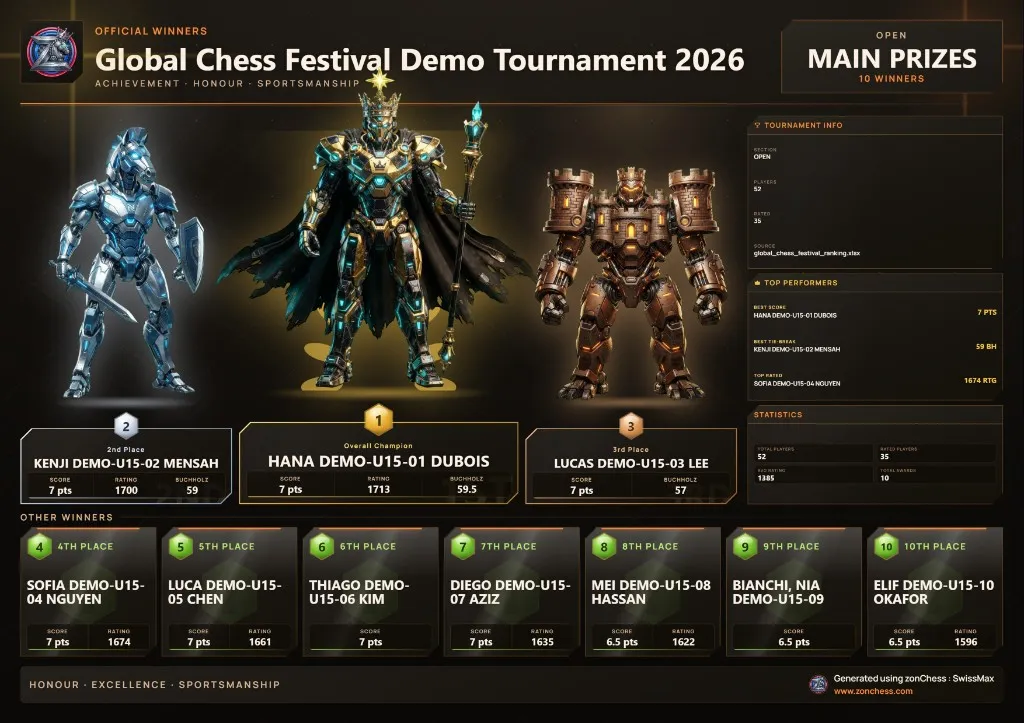
A podium is a shape people already know: first in the centre and tallest, second to its left, third to its right. Your eye goes to the middle and works outward. The winner graphic now uses that real 4–2–1–3–5 arrangement, so a parent glancing at a photo on WhatsApp reads it the way they expect to.
Each place carries a chess piece — King for first, then Rook, Bishop, Knight and Pawn, with Queen for women's prizes. Younger juniors identify the piece before they parse the numeral, the grammar transfers across every theme, and a club event with fifteen participants ends up looking like something happened. Sixth place onward continues cleanly below.
More on the design reasoning here.
4. Licensing designed for a hall with no signal
This is the least visible change and possibly the most important. Once SwissMax is activated, it keeps working through an offline restart, a venue with no reception, or a temporarily unreachable server. Your licence also stays valid across version upgrades without re-entering anything — upgrade the PC the night before an event and nothing asks you for a key in the morning.
Updates follow the same principle. Every update is verified against a published size and hash before it can install, installation never begins on its own, and downloads and installs are refused outright while the Scoring Hub is live. Nobody gets an update prompt in the middle of a round.
Also worth knowing
- Refresh & Compare. Republish a round and see exactly which boards changed and which were removed — names, ratings, points, federation, starting number — instead of re-reading sixty lines.
- Winner Studio, explained. Each duplicate-prize policy carries a short description and a tooltip spelling out its real effect on the overall list, the category prizes and the special prizes, with a walkthrough covering ranking, schemes, selection and publishing.
- Output for every wall. Printer Friendly renders a dense, clearly premium table that stays readable while keeping ink use low. Champion Spotlight shows only the points, tie-breaks and opponent ratings that genuinely exist in your source data — never an invented figure.
- Every export is kept. Exported filenames carry a date-and-time prefix, so regenerating a page sits alongside the earlier version rather than replacing it.
A note on ratings, and on where SwissMax comes from
SwissMax reads two rating sources today: FIDE, and MCF — the Malaysian Chess Federation, Malaysia's national rating list. That is because SwissMax is built in Malaysia and its field testers are Malaysian organizers, so MCF is the national list we could get right first.
Everything else in the product is not country-specific. Registration cleanup, Swiss-Manager export, pairing graphics, LAN scoring, winners and certificates all work anywhere Swiss-Manager does. If you organise outside Malaysia and would like your own national federation's list — or your league, club or school rating — handled the same way MCF is, tell us which one you use. We will do our best to support it.
Where this leaves the launch
The tournament day is covered. What remains before a public release is the commercial side — final licence terms, delivery and support — alongside more organizers running the current build at live events. That is also why pricing is not published on this site yet: the terms are genuinely still being settled, and we would rather announce them once, properly.