Oct 2026 ChessZCam: Studio first, Android next, Live last. Free 14-day Studio trial · 50% waitlist discount when sales open. Join the waitlist →

zonChess ecosystem · Malaysia

Tournament technology
for real chess halls.

Two products, one obsession: remove the repetitive work around an over-the-board tournament so organizers, arbiters, coaches and parents can spend their attention on the chess.

Explore SwissMax Explore ChessZCam
Autumn 2026 builds ChessZCam: friends test first, then waitlist
2Products in active development
29Certificate templates in the rebuilt E-Certificate Studio
14Premium pairing graphic templates
22Winner graphic themes, print-friendly included
4KChessZCam overlay video export, landscape or portrait
3Interface languages: EN · BM · 中文
A note to everyone on the waitlist

The project is alive — and busier than ever.

Thank you for registering. We know it has been quiet on the outside, so here is the honest status: both SwissMax and ChessZCam are being actively built and tested, and this autumn has brought some of the biggest changes yet — shown with real screens on each product page.

ChessZCam package prices are announced, with 50% off the first package purchase for waitlist supporters when sales open. Studio trial invitations come first, followed by Android APK and Live. Release dates and SwissMax pricing will be announced separately; joining is free and is not an order.

  1. Early trial first. Everyone registered on the waitlist receives the early trial version of SwissMax and ChessZCam before the public release.
  2. Built with you. Your feedback from real events goes straight to the developer and shapes the final build.
  3. Launch news to you first. Date, price and licence terms are announced to the waitlist before anywhere else.

Autumn 2026 · the newest capabilities

What arrived this autumn.

CHESSZCAM · MID-OCTOBER

For OTB chess creators

The creator workflow in motion — film, detect, check, analyse, render, share — with real screens and photos from two October tournaments.

Watch the workflow →
CHESSZCAM · GUIDE

How to record for the best result

Nine illustrated rules and a printable checklist: camera angle, framing, light, a steady stand and settings.

Open the guide →
CHESSZCAM · OCTOBER

Viewer Mode

Parents and coaches outside the playing hall follow the live digital board on their own Android phone, on the same Wi-Fi or hotspot — used at two tournaments in October. Not from home.

See how it works →
SWISSMAX · SEPTEMBER

E-Certificate Studio, rebuilt

Design directly on the certificate: drag, resize, rotate and edit every line in place, with 29 templates and EN/BM/中文 wording.

See the certificates →
SWISSMAX · SEPTEMBER

A calmer workspace

Seven numbered areas and a status bar that always shows tournament, section, round, last save and last backup.

See the screens →
FIELD TESTS · JULY → SEPTEMBER

Four real tournaments so far

KawanCatur, Taiping Mall, SJKC Keong Hoe and Lotus's Kulim: each test fed the next build.

See the field tests →
CHESSZCAM · SEPTEMBER

Analyze, review, export

Detect every move from a recording, fix anything uncertain beside the video evidence, then export a PGN or an overlay video up to 4K.

See the workflow →
AFTER THE CREDITS

Meet the SwissMax Mecha cast

King, Queen, Rook, Bishop, Knight and Pawn — the six chess-piece heroes who stand beside the winners on SwissMax podium graphics.

Open the Mecha page →

A note from the developer

Built by a chess parent — not a company, and without a sponsor.

I started building these tools to support my own children's chess journey. SwissMax and ChessZCam are made by one independent developer — no large company, no investor, no sponsor — designed and tested the hard way, on real tables in real tournament halls.

My hope is that they become a bridge between a child's chess journey and giving something back to the chess community. Because they are built with limited time and resources, please do not expect perfection. What I can promise is honesty, steady improvement, and a genuine welcome for constructive feedback — so that, together, these projects can grow into a real part of the worldwide chess community.

The two systems

One handles the tournament. One handles the board.

They are separate products with separate release clocks. You can run either one on its own — and the coming zonChess portal is where their outputs will finally meet.

In active development · Windows

SwissMax

A Windows companion for the work around Swiss-Manager: registration cleanup, Swiss-Manager import files, broadcast-grade pairing posters, LAN score collection, prize schemes, winner graphics, certificates and rating previews.

  • Smart registration — messy Forms/Excel/CSV/PDF in, clean Swiss-Manager XML out
  • Premium pairings — 14 A4 templates, per-page export, Refresh & Compare
  • LAN score hub — helper phones feed the organizer PC on the venue network
  • Winner Studio — prize schemes, duplicate-prize policies, podium graphics
  • E-Certificate Studio — rebuilt: design on the page, 29 templates, EN/BM/中文, 300-DPI PNG & PDF
  • Estimated Ratings — FIDE and MCF (Malaysia's national list) change previews before results go official; tell us if you need your own federation's list
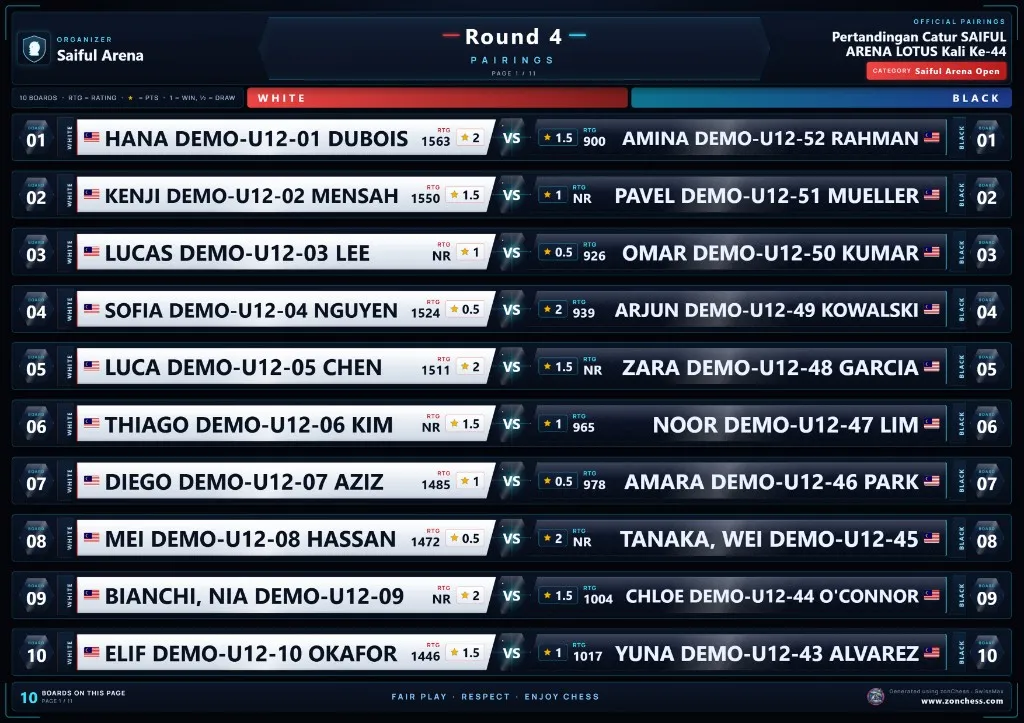
SwissMax pairing poster in the Arena Neon template, showing board numbers, player names, ratings and points
In active development · Android + Windows

ChessZCam

ChessZCam · phone & Studio ChessZCam Live · vMix & OBS

Point an Android phone at an ordinary chessboard and get a live digital position, a PGN and a browser overlay for OBS or vMix — without buying a fleet of electronic boards.

  • Six operations — Record Game Video, Analyze Video, Detect Live Game, Broadcast Live, Sync PGN to Video, Open Project
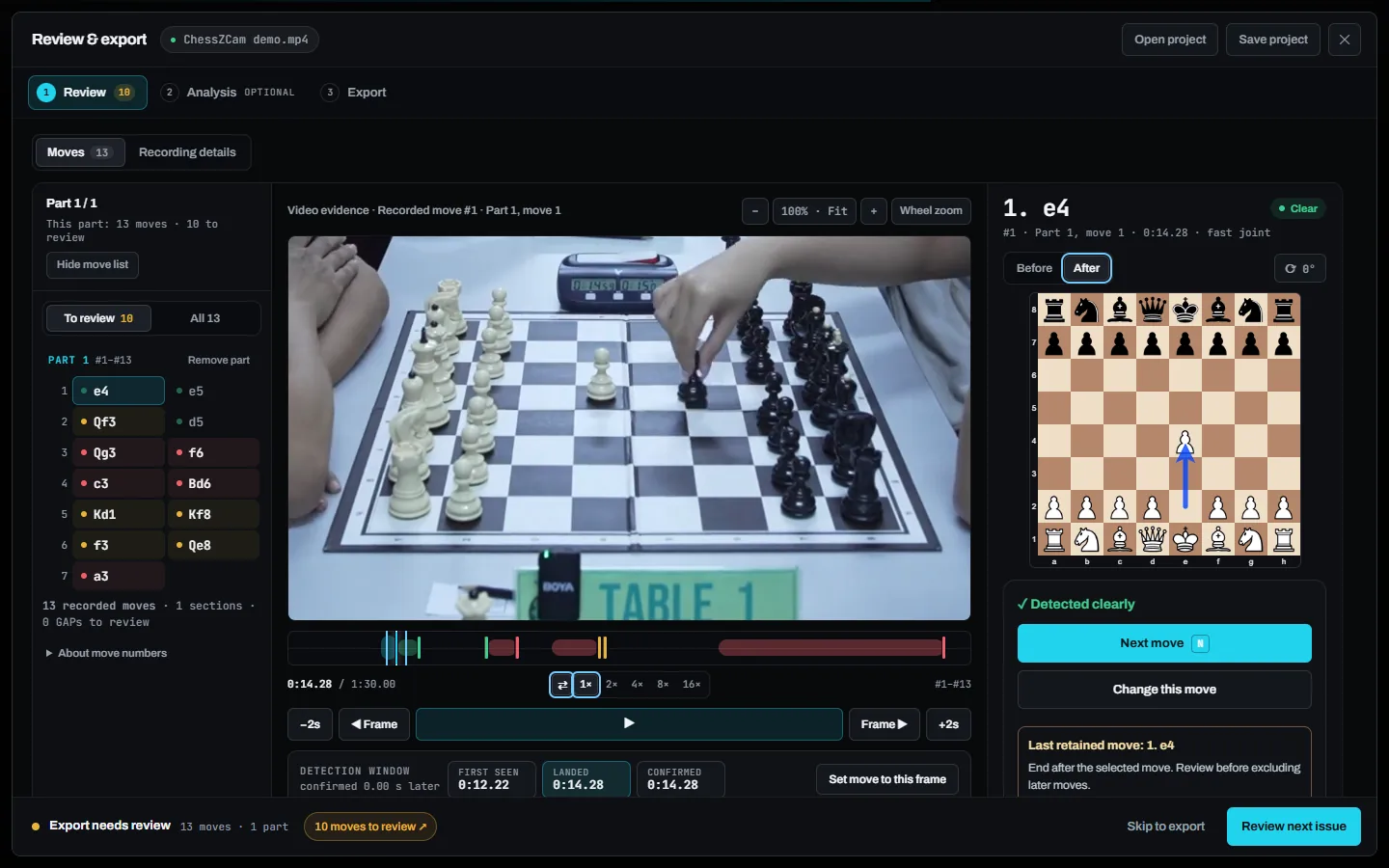
  • Review & repair — video evidence beside every move, add or fix moves on the board, rescan
  • Stockfish on the device — ten move grades, accuracy, openings, EN/BM commentary
  • Overlay video export — MP4, transparent WebM or PNG sequence, up to 4K, landscape or portrait
  • Live vMix/OBS console — Tally-style operator screen and a drag-and-drop Overlay Designer
  • Viewer Mode — new, in trial builds: parents and coaches outside the hall follow the live board on an Android phone, same Wi-Fi or hotspot
  • Local detection — works offline, no account; a PC only adds speed and screen space
ChessZCam review screen with move list, video evidence and the board after each move

The rationale

We are not trying to replace anything that already works.

Every design decision in both products comes from the same three rules. They are also the reason certain popular features are deliberately missing.

①

Authority stays where it is

Swiss-Manager pairs and ranks. The Chief Arbiter decides. Chess-Results publishes. SwissMax handles data preparation, presentation and collection around those systems and never invents an official result.

②

The hall is offline until proven otherwise

Hall internet is never something you can count on. So player data is processed on the organizer PC, scoring runs on the venue LAN, board detection runs on the phone, and your licence keeps working when the signal does not. A tournament should never wait on a network.

③

Pride is a feature, not decoration

A junior who sees their name on a pairing poster that looks like a game screen comes back next month. Parents share it. That is real growth for the sport — so the graphics get engineering effort, not an afterthought template.

Staged rollout

Coming soon

ChessZCam packages are Mobile RM99 / USD24.99, Studio RM149 / USD39.99 and Creator Live RM249 / USD69.99, with 50% off the first package purchase for waitlist supporters when sales open. The free Studio trial lasts 14 days from the moment you agree to the terms and start the trial in Studio (no code needed). SwissMax pricing and release dates will follow separately. No checkout is open.

What you can do nowJoin the waitlist and send feedback that shapes what ships next.
What comes firstThe early trial builds — sent to everyone on the waitlist before the public release. ChessZCam begins with Studio, then Android APK, then Live; the first-purchase waitlist discount is 50%.
What will not changeLocal-first processing, your tournament data staying on your own device, and honest release notes.

What comes after this page

The zonChess portal — the part that connects everything.

SwissMax cleans and produces tournament data. ChessZCam produces live game data. Today those outputs end in a folder or a broadcast. The portal in build turns them into something a player can follow across a season.

♜

Tournaments

Discover events, entry details and published pairings in one place instead of six WhatsApp groups.

♞

Players

One player identity with FIDE, MCF and zonChess figures kept clearly labelled and never quietly blended.

♛

Organizers

Publish an event, take registrations, and hand a clean list straight into the SwissMax workflow.

▶

Watch & learn

Featured boards, field notes and the archive of games that ChessZCam already knows how to record.

Timeline: weeks, not days. This interim site stays online until the portal is genuinely usable — we would rather ship it late than ship it during someone's tournament.

Get involved

Built with organizers, not at them.

If you run tournaments, coach juniors, or broadcast club events, your friction is the roadmap. Tell us what breaks on your tournament day.

ChessZCam · 15 October 2026

A staged release

Studio first → Android APK → Live. A free 14-day Studio trial that you start yourself in Studio, with no code; package prices and the 50% waitlist offer are announced.

See packages & trial details